A Consultant’s Guide to Practical Adoption and Responsible Use
When new technology explodes onto the scene, we often think of it in terms of potential—the time we’ll save, the ideas we’ll generate, and the mountains of data we’ll finally conquer. But as a Practical AI Adoption and Responsible Use Consultant, I’ve learned that the most important question isn’t what AI can do, but how we use it.
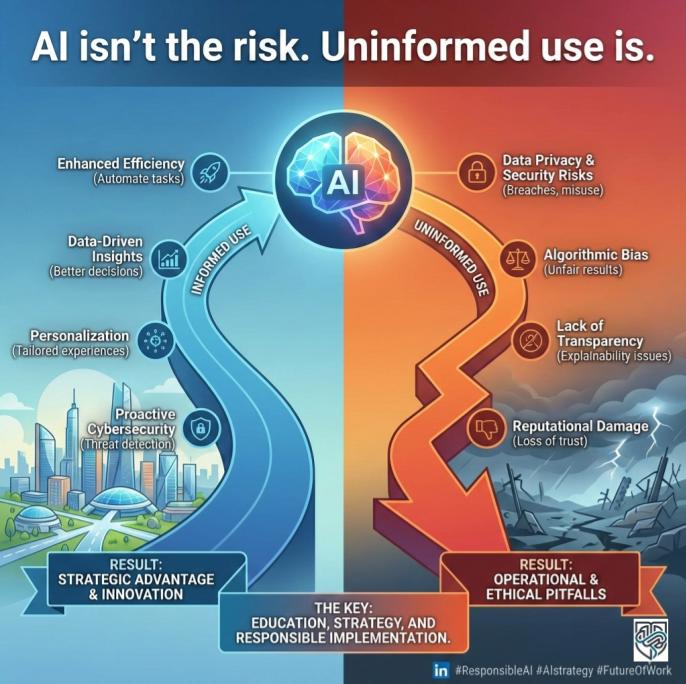
The difference between a productivity superpower and a massive security risk often comes down to a single, easily overlooked setting.
I had a recent conversation that brought this into sharp focus. My colleague, who works at a partner organization, was clearly burned out. The demand for their services had surged, and he was drowning in administrative work—specifically, drafting initial emails and setting up client spreadsheets.
“It’s great, though,” he told me, leaning back in his chair, exhausted but relieved. “I’ve been using ChatGPT to draft all my welcome emails and fill in client summaries for our internal trackers. It cuts my admin time in half!”
I was genuinely impressed he was integrating AI into his workflow. That’s practical adoption in action! Then, a cold wave washed over me when he mentioned the details. He was using the free version of the tool, and to ensure the drafts were accurate, he was inputting things like clients’ full names, private contact information, brief summaries of their case details, and even financial snippets. In other words, he was feeding highly sensitive and proprietary client information—what we call Personal Identifiable Information (PII)—directly into a public, free-tier AI model.
“Wait,” I interrupted him. “Is that data being used to train the model?”
He paused. “I… I don’t know? It’s just the free one.”
We immediately stopped the conversation, and I guided him through checking his account settings. Sure enough, the default setting was enabled: his conversations were being saved and used to train the AI model for future users. Inadvertently, he had been sharing private client data with the AI provider, potentially exposing it to human reviewers and certainly making it part of a non-secure, non-compliant data set. We switched that training feature off immediately.
This real-world scare highlights a massive, growing challenge for both business leaders and everyday employees: using powerful tools like ChatGPT, Gemini, Perplexity, and Notion AI without proper constraints or instruction.
The adoption curve for AI is climbing vertically, but our understanding of responsible use is lagging far behind. This article is your comprehensive guide to closing that gap, ensuring your AI journey is driven by strategy and safety, not just speed.
The ‘New Hire’ Interview: Setting Expectations for Your AI Teammate
If you’re bringing an AI tool into your professional life—whether it’s a simple chatbot or a full-blown automation platform like Make.com—you need to treat it like a new team member. You wouldn’t hand a new hire the keys to the company vault on day one, nor would you let them define their own job duties.
AI needs an interview, a job description, and a clear set of rules.
1. Define the Job (The Outcome-Backwards Approach)
The search results show that successful AI adoption starts with a business metric, not the technology itself. This is what we call Outcome-Backwards Planning.
- Wrong Way: “We need to use Gemini Advanced because it’s new.”
- Right Way (Outcome-Backwards): “We need to reduce our customer service email response time by 30%. The job of the AI is to draft the first response for all Tier 1 inquiries.”
For the everyday user, this means giving your AI a clear Statement of Work (SOW). Before you type your prompt, ask yourself:
- What specific, measurable result do I want?
- What is the AI’s primary task (summarize, brainstorm, draft, code)?
- What data must it NOT use?
2. Set the Boundaries (The Human-in-the-Loop Principle)
The best AI implementations always have a human safety net. This is known as Human-in-the-Loop. The AI should produce a suggestion, not the final product.
Think of the 80/20 Rule of Work Redesign: Only about 20% of the value of AI comes from the technology itself. The other 80% comes from redesigning the work process around it.
For example, when drafting that client email, the AI handles the repetitive 80% (the greeting, the structure, the friendly closing), while you handle the critical 20% (reviewing, editing, and ensuring the accurate, non-sensitive details are correct). Never allow AI to fully automate high-stakes decisions or communications without a human being reviewing, verifying, and taking final responsibility.
Beyond the Basics: Mastering the Art of Prompt Engineering
The quality of your AI output is a direct reflection of the quality of your input. This is where Prompt Engineering comes in—it’s simply the craft of asking good questions. You don’t need a degree in computer science; you just need to think like a helpful, detailed manager.
The most effective prompts follow a simple structure, providing the AI with the Context, Persona, Task, and Constraints.
The CPTC Framework for Powerful Prompts
| Element | Description | Example Detail |
| Context | Why are you asking? Provide necessary background and data. | “I am the head of marketing for a small, sustainable coffee brand.” |
| Persona | Who should the AI be? Set its role and tone. | “Act as a friendly, authoritative, and non-technical business consultant.” |
| Task | What exactly do you need it to do? Be specific about the output format. | “Draft five bullet points for a blog article. Ensure the tone is conversational.” |
| Constraints | How should the AI limit itself? Include length, forbidden words, and safety rules. | “The output must be under 300 words. Do not use the phrase ‘paradigm shift.’ Do not include any PII or confidential client data.“ |
By using this framework, you move from vague requests like “Write me an email” to highly optimized instructions that deliver usable, compliant content. You are, in effect, teaching the AI to think strategically.
The Toolkit Tangle: Choosing the Right AI for the Right Job
My colleague’s mistake wasn’t using AI; it was using the wrong kind of AI for a sensitive job. Understanding the crucial difference between free, general-purpose tools and paid, enterprise-grade platforms is perhaps the most practical lesson in AI adoption.
This difference often boils down to the “Digital Sandbox” concept.
Free vs. Paid: The Digital Sandbox
- Free Tools (e.g., Free ChatGPT, Free Gemini):
- The Shared Playground: These models are often like a shared public playground. By default, when you type a prompt, that interaction is saved and potentially used to help the AI get smarter. This is why you must assume your inputs are NOT private.
- The Risk: If you enter client PII, confidential business plans, or proprietary code into a free tool without adjusting the privacy settings, you are effectively giving that data away. The benefit is convenience; the cost is data security and compliance.
- Best Use: Brainstorming, drafting non-sensitive content (social media captions, general ideas), learning prompt engineering, and low-stakes personal tasks.
- Crucial Step: Always check your settings and opt out of data training (e.g., turning off “Chat History & Training” in ChatGPT or “Gemini Apps Activity” in Google Gemini settings).
- Paid/Enterprise Tools (e.g., ChatGPT Enterprise, Google Workspace with Gemini, Microsoft Copilot):
- The Digital Sandbox: Paid tools, especially those integrated into your existing business environment (like Google Workspace with Gemini Side Panel or Microsoft Copilot), operate in a secure, isolated digital sandbox.
- The Promise: Your inputs and the AI’s outputs are typically kept within your organization’s security boundaries. They are not used to train the company’s broader AI models. This commitment to data isolation makes them compliant with standards like GDPR, HIPAA, and SOC 2.
- Best Use: Drafting emails with actual client names (because the data stays within your secure domain), summarizing confidential meeting notes in NotebookLM or Notion, analyzing proprietary financial data, and any task requiring high data security and legal compliance.
The consultant’s practical advice is simple: If the data you are entering could get your company fined, sued, or embarrassed, it belongs in a paid, compliant, enterprise environment with strict controls.
Non-Negotiables: Your Ethical AI Adoption and Responsible Use Playbook
The moral of my colleague’s story—and the biggest lesson for all AI users—is that responsibility is paramount. AI is not just a tool; it’s a decision-maker and a processor of information, often operating on biases we can’t immediately see.
To build an organization (or a personal workflow) that is both efficient and trustworthy, you need an Ethical AI Playbook.
1. Prioritize Data Privacy and Security
This is the most critical step. Your policy must be crystal clear:
- PII Is Forbidden in Free Tools: Personal Identifiable Information (PII)—names, addresses, account numbers, etc.—must never be entered into a public-facing, free-tier AI model.
- Anonymize Everything: If you must use a public tool for a confidential task, strip out every identifying detail. Replace names with placeholders (e.g., “Client A”), specific dates with “Q3 FY24,” and confidential figures with “[Proprietary Number].”
- Opt-Out by Default: If you can’t use a paid enterprise tool, the immediate action is to ensure all employees know how to and are required to turn off the chat history and model training feature on any public AI they use for work.
2. Ensure Fairness and Mitigate Bias
AI models are trained on historical data, which often reflects historical societal biases (gender, race, socio-economic status). If an AI is used in high-stakes contexts (hiring, loan applications, legal assessments), this bias can lead to unfair or discriminatory outcomes.
- Check the Source: Understand where your AI’s information comes from. For critical tasks, ask the AI to cite its sources or rely on tools like Perplexity or NotebookLM, which are designed to search and summarize specifically on uploaded documents or verified web sources.
- Review for Representation: When using AI to generate images, text, or policy, review the output for subtle biases. For example, if you ask an AI to generate images of a “CEO,” does it only produce one gender or race? If you ask for a “nurse,” does it only show another? Human Oversight is essential for detecting and correcting these flawed assumptions.
3. Demand Transparency and Accountability
Transparency in AI means understanding how a system arrived at a conclusion. While generative models are sometimes called “black boxes,” responsible use requires a commitment to explainability.
- Ask for the ‘Why’: Always include a prompt constraint that asks the AI to “Explain your reasoning” or “List the assumptions you made.” This is especially important when using AI to summarize complex data.
- Establish Clear Accountability: Leaders must define who is responsible when the AI makes a mistake (a hallucination). If an AI-drafted email results in a legal issue, the human employee who hit “send,” or the company whose policy failed, is ultimately accountable. AI is a tool, not a scapegoat.
Strategic Moves: How Leaders Can Future-Proof Their Organization
For business leaders, AI adoption is not a technology project; it is a change management and governance strategy. The goal is to scale value while keeping risk under control.
1. Formalize Your AI Policy
Establish clear rules that address the real-world scenarios your employees face every day, starting with the Free vs. Paid distinction.
- Tiered Usage Guidelines: Define which data types are permitted in which tools.
- Tier 1 (Public/Free): No PII, no trade secrets, no confidential financial data.
- Tier 2 (Paid/API): Limited PII, internal communication drafts.
- Tier 3 (Enterprise/Secure Workspace): All internal data, compliance guaranteed.
- Incentivize Safety: Integrate responsible AI use into performance reviews and team training. Reward teams that successfully implement AI solutions while maintaining 100% data compliance.
2. Invest in Literacy, Not Just Licenses
Don’t assume buying a license to Google Workspace with Gemini means employees know how to use it safely or effectively.
- Mandatory Training: Provide hands-on training on Prompt Engineering and Ethical AI Guidelines. Make sure employees understand why they must anonymize data and how to turn off data training features.
- Foster a Learning Culture: Create internal communities where employees can share successful prompts, discuss ethical dilemmas, and report AI errors (hallucinations) without fear of punishment. This helps crowdsource intelligence and build shared institutional knowledge.
3. Start Small and Scale Smart
The best strategy is to go Narrow and Deep. Don’t try to automate your entire business at once.
- Target a Pain Point: Pick a single, high-volume, low-risk workflow (like drafting internal meeting summaries or triaging inbound generic inquiries).
- Measure Everything: Use key performance indicators (KPIs) like “cycle time reduction” or “error rate decrease.” If the AI doesn’t move the needle on a real business metric, adjust the prompt or scrap the use case.
Small Steps, Big Impact: AI for the Everyday Individual
For the individual user, AI is the ultimate productivity lever. But maximizing its value requires moving past simple chat and leveraging its specialized features.
1. Leverage Specialized Tools
You don’t need one tool for everything. Use specialized platforms to maximize output quality and privacy:
- For Deep Learning: Use NotebookLM. By uploading your own long documents (research, company manuals, PDFs), you create a model that only draws information from your trusted, private source documents, making it highly secure for personal research.
- For Automation: Explore Make.com (formerly Integromat) to connect your AI to your other applications. For example, trigger an AI draft when a new form is submitted, then automatically send it to your draft folder.
- For High-Quality Drafts: Use the paid versions (ChatGPT Plus or Gemini Advanced) for tasks that require the most advanced reasoning, creativity, and context retention (like drafting a complex presentation outline or a detailed project plan).
2. Treat AI as a Thinking Partner
The goal is not to outsource your brain, but to augment it.
- Challenge Its Output: When the AI gives you a response, ask: “What evidence supports this? What is the counter-argument? What assumption did you make about my audience?” This forces the AI to check its work and encourages your critical thinking.
- Maintain a Prompt Library: Just as you save template emails, save your most successful prompts. When you get a perfect response for a project outline, save the CPTC prompt you used. This lets you quickly replicate high-quality work without reinventing the wheel.
Key Takeaways for Leadership and Everyday Users
The future of work is not about replacing humans with AI; it’s about humans who use AI replacing those who don’t. Here are your final action points for practical, responsible adoption.
| For Leadership (Strategic Adoption) | For Everyday Users (Responsible Use) |
| Establish a Data Firewall: Mandate that all PII and proprietary data use must occur within an Enterprise-grade, compliant platform (Google Workspace, Copilot, etc.). | Turn Off Data Training: If using a free tool, immediately locate and disable the setting that allows the AI to use your conversations to train the model. |
| Develop a Clear AI Policy: Publish a formal, easy-to-read document that defines acceptable use, accountability, and the consequences of misuse. | Anonymize Your Inputs: Never input real client names, social security numbers, or sensitive financial figures into public AI tools. Use placeholders. |
| Redesign Workflows First: Focus on the 80/20 rule. Identify specific KPIs and ensure AI is used as a human-in-the-loop assistant, not a blind automaton. | Master the CPTC Framework: Treat your prompt like a job description. Include Context, Persona, Task, and Constraints for better, safer outputs. |
| Invest in Literacy: Provide mandatory, practical training on prompt engineering, bias detection, and ethical use to all employees. | Review and Verify Everything: Treat AI output as a draft. You are the editor, fact-checker, and the final responsible party. Always check for hallucinations. |
Conclusion: The Power of Safe Prompting
The fear of AI is often the fear of the unknown. By shifting our focus from adoption to responsible adoption, we turn that fear into a blueprint for success. Whether you are leading a corporation or managing your personal task list, the difference between success and a costly mistake is just a few words in a prompt.
Here is an example of the safe, constrained prompt I wish my colleague had used:
Sample Safe Prompt (for ChatGPT/Gemini Free Version):
<Persona>
Act as a professional and friendly customer success manager. Your tone should be welcoming, detailed, and reassuring.
<Context>
I need to send a welcome email to a new client who has just signed up for our “Premium Support” package. Their service ID is [SERVICE_ID_1234].
<Task>
Draft a welcome email template. The email should include three distinct bullet points detailing the benefits of the Premium Support package. It should encourage them to book their first onboarding call via a link (use the placeholder [BOOKING_LINK]).
<Constraints>
The final email must be concise (under 200 words). **MOST IMPORTANTLY: DO NOT include any specific client PII, confidential case details, or financial information in the draft.** Use only the placeholder [CLIENT NAME] in the greeting.
By using constraints like this, you leverage the power of Generative AI while respecting the foundational rules of data privacy. Be smart, be safe, and be the leader of your own AI journey.
Ready to Future-Proof Your Workflow?
Take the first step toward responsible scaling today.
Identify one high-risk, PII-sensitive task you currently outsource to a free tool and move it immediately to a secure, compliant platform like Google Workspace with Gemini or a verified enterprise solution. Do not wait for a breach to define your policy—define your policy today.